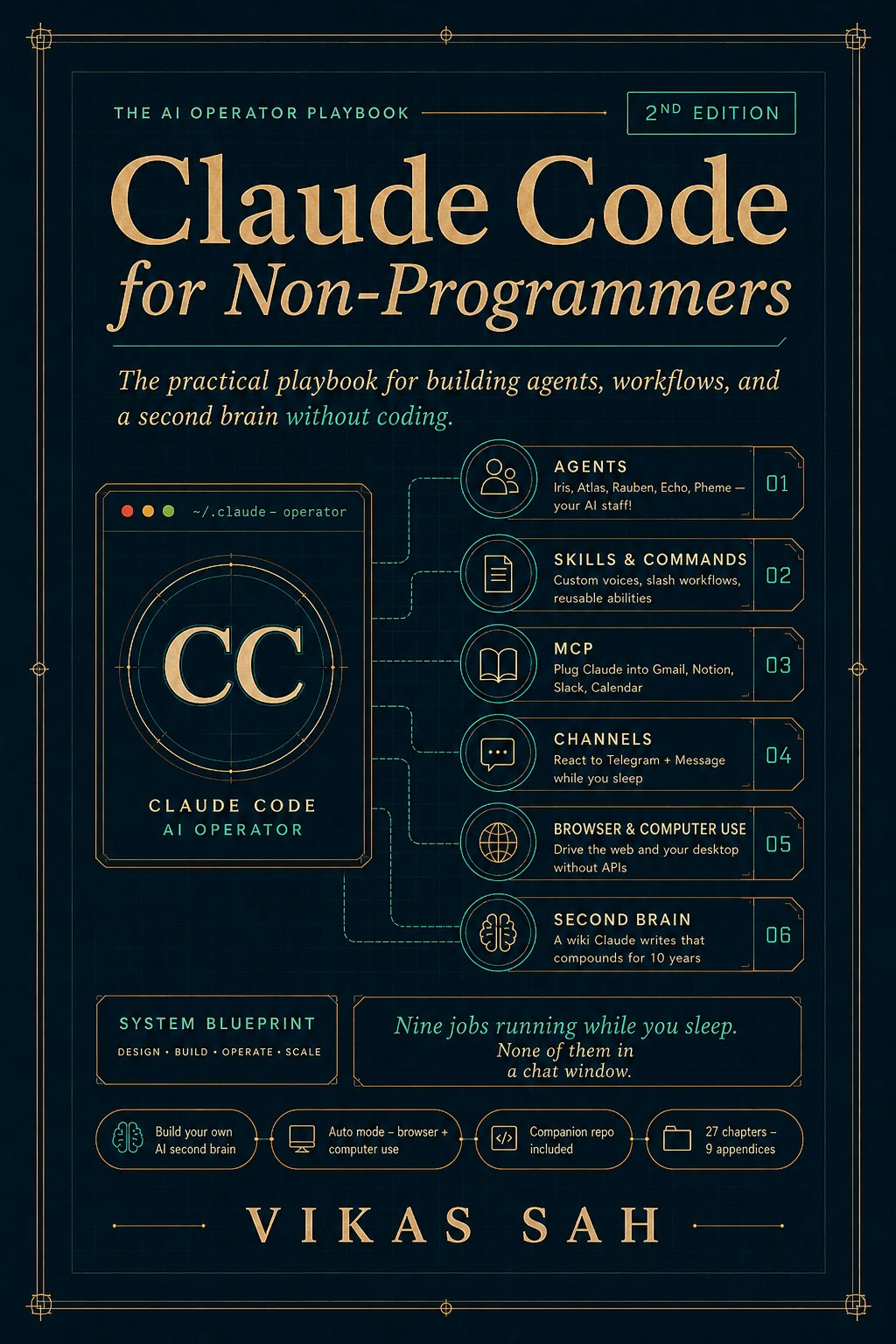
The agentic filter the book defends. Honest exclusions.
Every chapter passes a single test before it earns a spot: could ChatGPT do this in a chat window? If yes, the chapter is teaching the wrong thing. This is not a book of clever prompts you paste into a browser. It is an operator's manual for the version of Claude that lives in a folder on your laptop, reads your real files, runs your real shell, and ships work to your real apps.
It is also honest about who it is not for. Pure software engineers will find the conceptual ramp too gentle (read AI Engineering by Chip Huyen, or the Anthropic docs, instead). Mobile-only readers will hit a wall in Chapter 3, because Claude Code needs a real computer. Anyone who loves the chat-tab workflow and is not trying to leave it will find the agentic filter unconvincing. The book asks you to give up the tab.
Maya hires Claude Code to do these. Built once. Run forever.
By Chapter 27 Maya has built nine recurring jobs that run on a schedule, in the background, with no chat window open. Each one is built across two to four chapters; each one ships an artifact you can use the day you finish it.
- Reconcile your money in ten minutes from a bank export and a Stripe CSV. Ch 2, 11
- Route Gmail into Notion automatically, with drafts written in your voice (never auto-sent). Ch 9
- Watch competitors and surface pricing or positioning changes every week. Ch 10, 20
- Monitor your deploys and escalate problems before customers notice. Ch 17
- Scrape pages that have no API: cancel subscription leaks, pull 50 competitor pricing pages. Ch 20
- File your monthly P&L from CSVs and APIs. Ch 11
- Refresh a live dashboard your co-founder reads every morning at 3 AM. Ch 22
- Run a staff of five named specialists that operate while you sleep. Ch 9-13
- React to Telegram and iMessage messages while you sleep, via Pheme. Ch 13
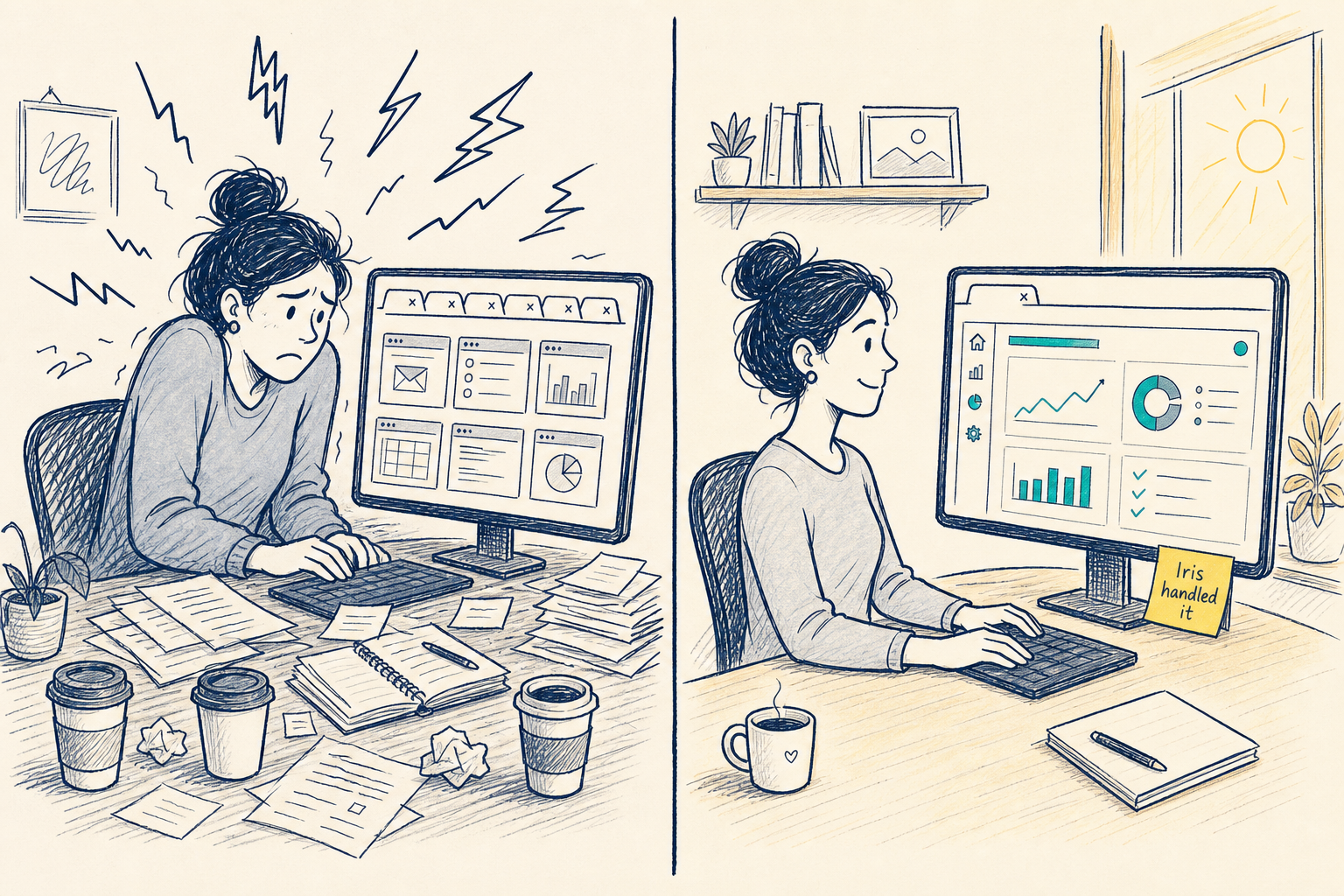
The before-and-after of running a small AI staff.
Before Claude Code: 64 unread emails, six browser tabs open to competitor pricing pages, a bank export that has been sitting in Downloads for eleven days, six dashboards to check every time your co-founder asks how things are going, a Slack DM about subscription spend you cannot answer without opening five files, and a deploy that broke at 11 PM with the customer emailing you first. After Claude Code: inbox triaged with drafts ready, one daily file Atlas wrote that surfaces the competitor signals worth knowing, Sunday-night reconciliation already in your inbox by Monday morning, one HTML dashboard your co-founder reads at her desk, last month's subscription leaks already cancelled, and a watchdog that flagged the broken deploy at 11:03 PM so you knew before bed.
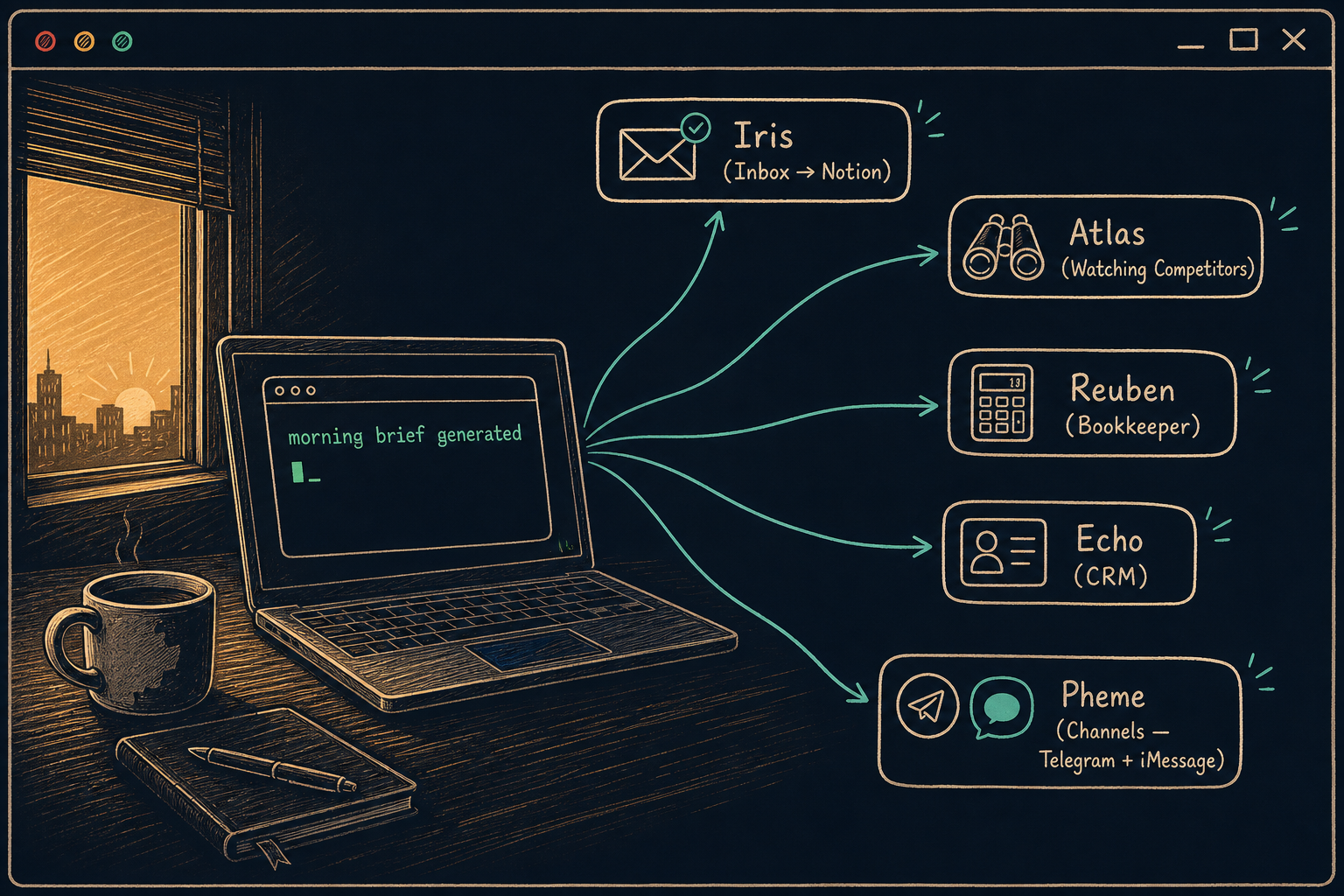
Five named specialists. One named operator: you.
Part III of the book hires the staff. Each specialist is a subagent with a single job, a short instruction file, and the smallest possible set of tools. Maya gives each one a name because that is how you remember which one to fire when it misbehaves.
Triages Gmail, files threads into Notion, drafts replies in your voice. Never auto-sends.
Watches competitors, scans pricing pages, writes a daily one-pager of what changed.
Reconciles bank exports with Stripe, files a monthly P&L, flags weird transactions.
Cleans duplicate contacts, enriches stale records, surfaces leads gone cold.
Listens on Telegram and iMessage, reacts while you sleep, knows when to wake you.
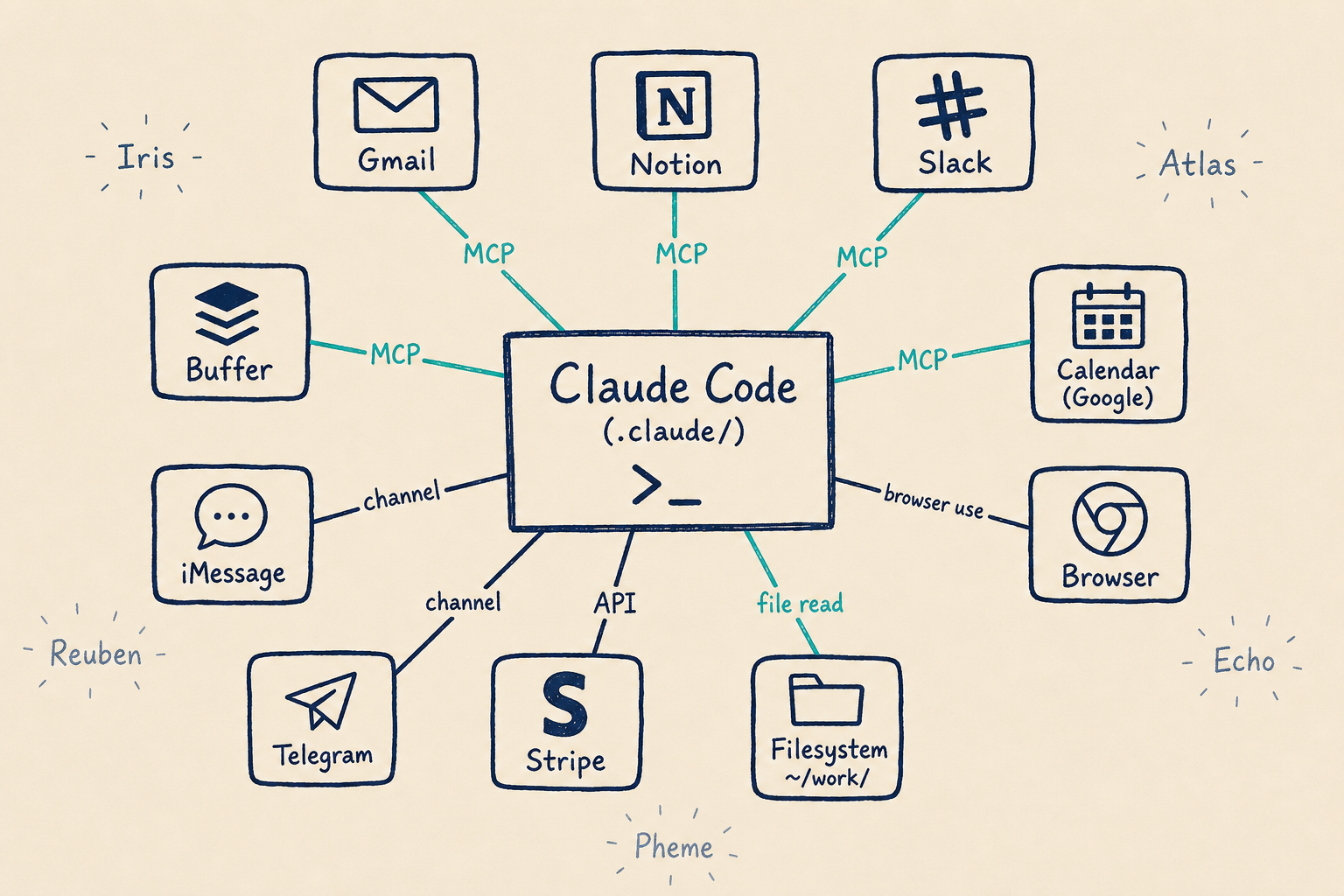
Claude Code in the middle. Your real stack on the edges.
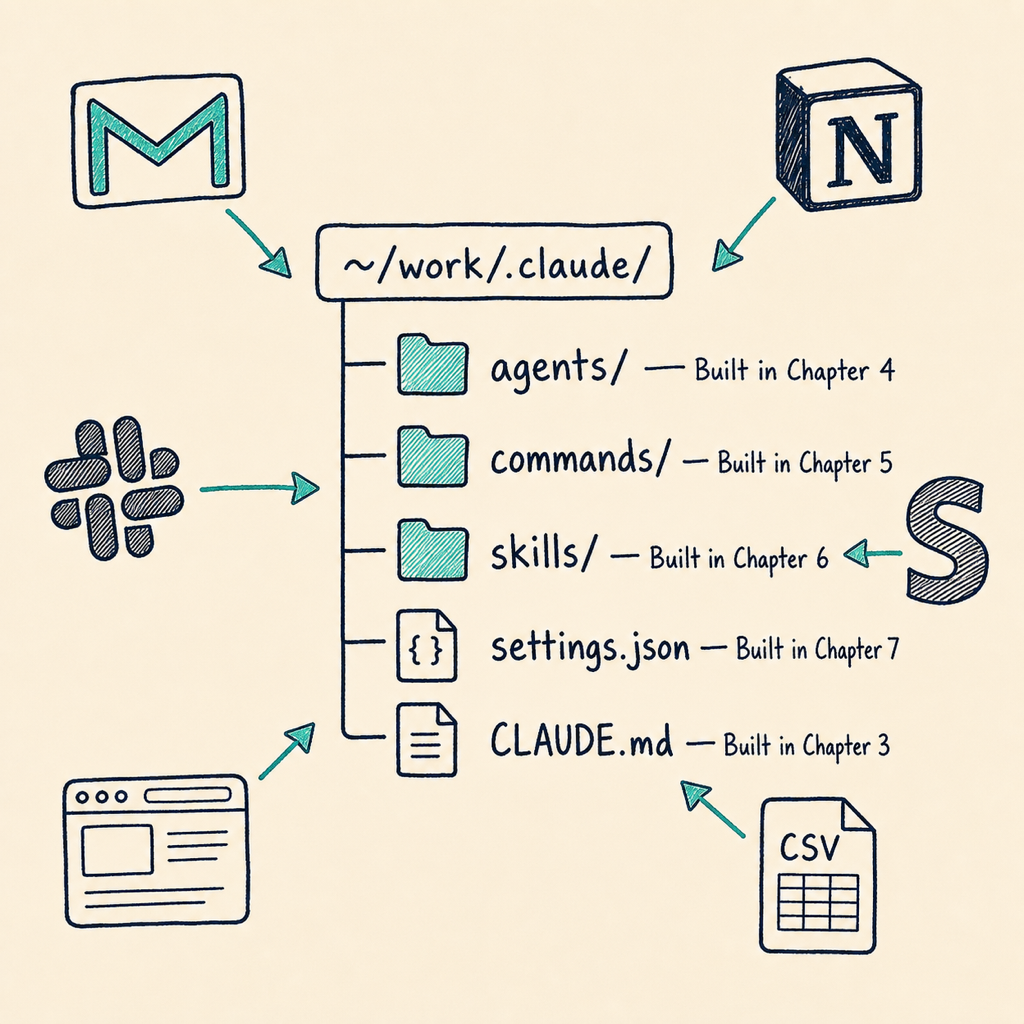
The book wires ten systems to Claude Code, in the order Maya wires them: files first (Ch 1), then money (Ch 2), then memory (Ch 3, the CLAUDE.md file), then verbs (Ch 4, slash commands), then apps (Ch 5, MCP servers for Gmail, Notion, Slack, Stripe), then schedules (Ch 7, hooks), then specialists (Ch 9 to 13), then channels (Ch 13, Telegram and iMessage), then browser (Ch 20, headless control), then dashboards (Ch 22). Each wire earns its place because it makes the next one possible.
You operate Claude Code through prompts. Claude Code operates everything else. That is the architecture diagram in two sentences.
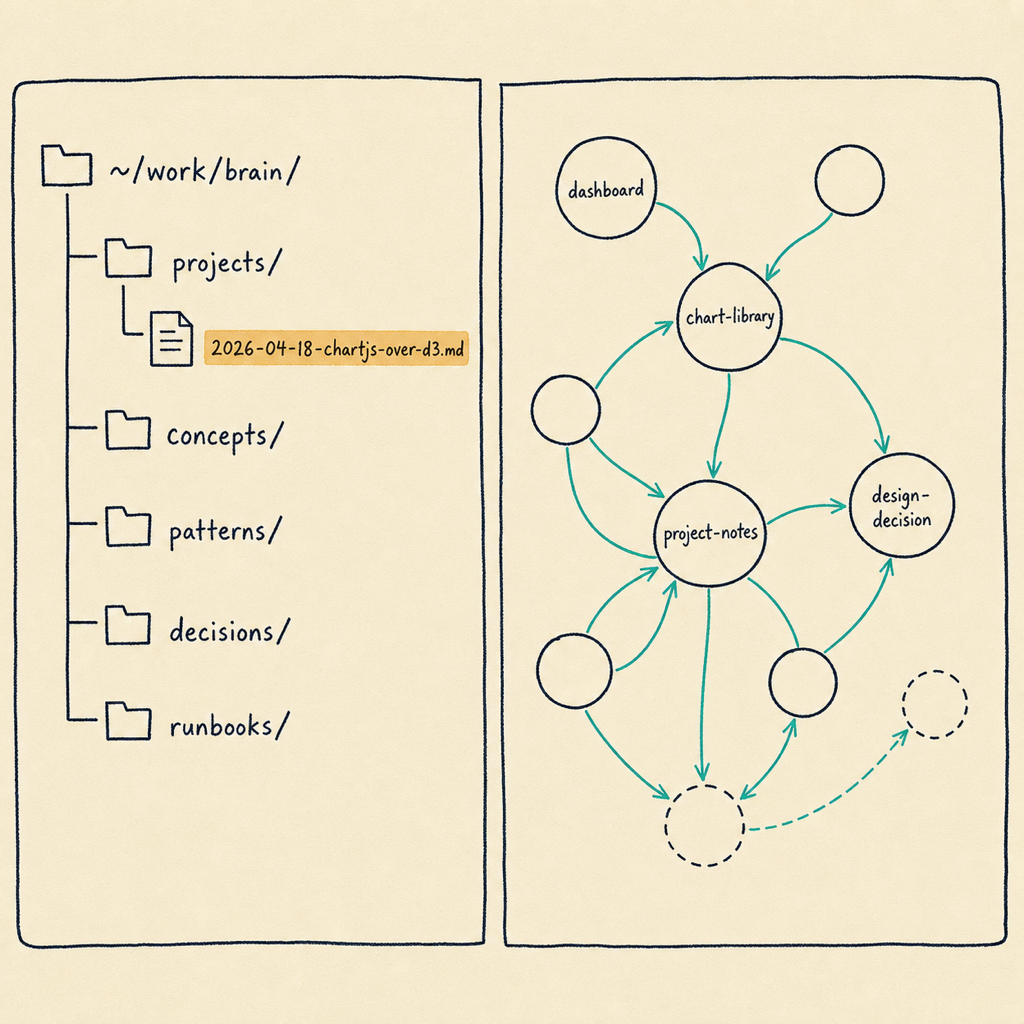
A wiki Claude writes for you. Compounds for ten years.
Chapter 26 is the bonus chapter and the most personal one. It is the Karpathy-inspired second-brain wiki: a folder of dated Markdown files Claude writes for you covering the decisions you made and why, the runbooks for the systems you built, the patterns you keep using, and the concepts you keep relearning. Five folders, three rules, one free app (Obsidian) to render the wiki visually with a graph view of linked entries.
Six months from now, when a new client asks what your process is for handling X, you have the file. Five years from now the folder is still there. Every tool in the wiki reads plain Markdown, forever. It is the artifact that compounds the longest.
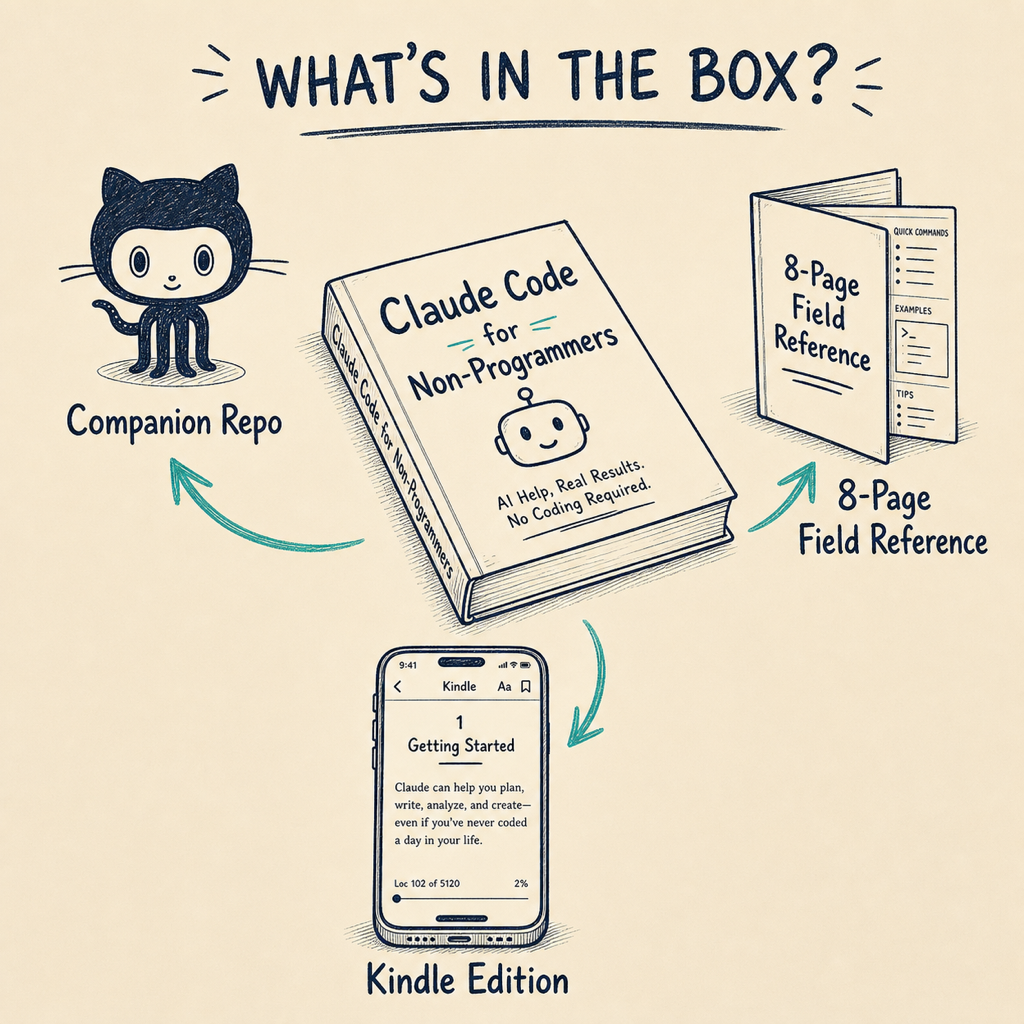
Book, repo, cheat sheet. The repo is free.
The book is 27 chapters across 9 parts plus 9 appendices: the curriculum that takes Maya from "scared of the terminal" in Chapter 0.2 to "I run a small AI staff" in Chapter 27. The companion repository is every chapter's .claude/ folder, the agents, the skills, and the scripts, ready to clone. The cheat sheet is an eight-page field reference covering the five core constructs, the hook menu, the permissions decision tree, and the CLAUDE.md anatomy.
Companion repo lives at github.com/codecoincognition/claude-code-4-non-programmers-v2. It is public. You can read it without buying the book.
27 chapters across 9 parts. Each part is a complete arc.
Plus nine appendices: 30 cross-system jobs I run every week, cost and safety, the plugin and Skills marketplaces, six MCPs I'd build next, troubleshooting and debugging agents, every line of my settings.json annotated, learn to code from here, why I picked Claude Code, and a power-user command reference.
The gap on the AI bookshelf, and the four books on either side of it.
There are excellent AI books for engineers and there are friendly AI books for the curious. There is almost nothing comprehensive written for the operator: the founder, the marketing lead, the consultant, the finance professional whose work does not happen in an IDE but whose appetite for sophistication is real. This book occupies that gap.
AI Engineering — Chip Huyen
Excellent. Built for engineers building production AI.
Assumes Python, deployment, MLOps. The right book if you are a software engineer shipping AI systems.
AI Agents in Action — Manning
Strong on the agent abstractions for engineers.
Framework-heavy. Assumes you want to write code in LangGraph, CrewAI, AutoGen. Operator-grade automation is not the goal.
Anthropic's official docs
Canonical reference for the tool.
Excellent surface coverage; thin on operator workflow. Tells you what every flag does, not which nine to chain together for a Tuesday morning.
This book
Operator-grade. Non-programmer audience. 27 chapters.
Comprehensive depth. Prompt-driven authorship. The agentic filter on every chapter. The version of Claude that does the work, not the version that talks about it.
If any of these describes you, the book is for you.
Two numbers and one piece of hardware.
Claude Code requires a paid Anthropic plan, which starts at roughly $20 per month for the Pro tier. That is the floor cost. Heavier use (the watchdog mesh, the dashboard, a busy Pheme) often graduates to a higher tier; the book is honest about which chapters cross that line and why.
A persistent computer is recommended for the "runs while you sleep" payoff. A desktop you leave on, a Mac mini in a closet, or a small rented server (the book covers both options). You can do all 27 chapters from your laptop, but a job that fires at 3 AM needs a machine that is still awake at 3 AM. macOS is preferred for the iMessage channel in Chapter 13 because the Messages app stores its database locally, and that database is the integration point. Everything else is cross-platform.
The questions readers asked most before buying the 1st edition. Updated for the 2nd.
Do I need to know how to code? +
No. The book is built on a prompt-driven authorship rule: you describe outcomes in plain English, and Claude writes the code, the agents, the hooks, and the scripts. You read the diffs, you approve the changes, you keep what works. Some technical literacy helps (you should be comfortable installing an app and editing a text file), but no programming background is required.
What's the difference between this and ChatGPT or Claude.ai? +
ChatGPT and Claude.ai live in a browser tab. They can answer questions and help you think, but they cannot read your Gmail, reconcile your bank export against Stripe, or drive your browser at 6 AM while you sleep. Claude Code lives in a folder on your laptop. It reads your files, runs your shell, talks to your apps through MCP servers, and works on a schedule. The book defends this distinction in every chapter with what it calls the agentic filter.
Do I need a Mac? +
Claude Code itself runs on macOS, Linux, and Windows (via WSL). The book leans on macOS for two specific things: the iMessage channel in Chapter 13 (Pheme) needs the Messages app's local SQLite database, which is Mac-only, and some screenshots assume a Mac terminal. Everything else works cross-platform. If you're on Windows or Linux you can do 26 of the 27 chapters with no friction.
What does it cost to actually use this stuff? +
Claude Code requires a paid Anthropic plan, which starts at roughly $20 per month for the Pro tier. That is the floor cost. The book also recommends a persistent computer (a desktop, a Mac mini, or a small rented server) for the "runs while you sleep" payoff. You can do all 27 chapters on your laptop, but jobs that fire at 3 AM need a machine that's still awake at 3 AM.
How is the 2nd edition different from the 1st? +
The 1st edition was a gentle on-ramp: 19 chapters teaching one task at a time. The 2nd edition is what comes after the on-ramp: 27 chapters, 9 appendices, and an explicit operator's frame. New material includes the full Pheme channels chapter (Telegram and iMessage), a three-chapter multi-agent studio (newsroom, launch crew, watchdog mesh), four projects you actually ship (deck, website, browser automation, dashboard), three chapters on advanced surface area (the agent SDK, /security-review, auto mode, browser and computer use), and a Karpathy-inspired second-brain wiki.
How long does it take to work through the book? +
Most readers take two to four weeks at one chapter per evening. The agentic filter means every chapter ends with you having built something real, so the pace depends on how much of that build time you want to spread out. A focused week of vacation gets you through the whole book. Spreading it across a quarter at one chapter per weekend is also normal.
Will this work for me if I'm a marketing manager, consultant, or finance professional? +
Yes. The book's primary persona is Maya, a non-engineer founder, but the specialist staff is built around exactly the jobs marketing managers, consultants, and finance professionals do every week. Atlas watches competitors. Reuben reconciles money and files a monthly P&L. Echo cleans CRM data. Iris triages your inbox. Pheme reacts to channel messages. The book is intentionally calibrated to operator work, not engineer work.
What if Claude Code changes after the book is published? +
Two answers. First, the book is stamped against specific versions and the companion repo carries an errata file that gets updated when meaningful surface changes ship. Second, the book is built around five core constructs (CLAUDE.md, slash commands, MCPs, subagents and skills, hooks) that have been stable across many releases. The specific flags will drift; the constructs are durable.
Does the companion repo come free with the book? +
Yes. The companion repository at github.com/codecoincognition/claude-code-4-non-programmers-v2 is public and free. It contains every chapter's .claude/ folder, the agents, the skills, and the scripts ready to clone. You can read the whole repo without buying the book. The book is the curriculum; the repo is the working code.
Is there community support? +
The companion repository is the only official community surface. Issues and discussions there get answered by the author. There is intentionally no Slack or Discord; the operator's frame of the book is about building systems that run without you, and that includes not requiring you to live in another chat surface.
What chapters cover the agent SDK? +
Chapter 25 covers self-improving agents and the agent SDK, including when to graduate from interactive Claude Code into the SDK for headless workflows. Chapter 23 covers session mastery and the latest surface area, and Chapter 24 covers code review at home (auto mode, /simplify, /security-review, /sandbox, /batch). Together those three chapters in Part VII cover the advanced surface area.
Can I read this on Kindle? +
Yes. The Kindle edition is live on Amazon at $21.99 (ASIN B0GDRJ32XT, published June 8, 2026). The Kindle version reflows cleanly for phones and e-readers, though a few of the wide stack diagrams read better on a tablet. A paperback edition is in production.
Is there an audiobook? +
Not currently. The book is highly visual (folder anatomies, stack diagrams, terminal output) and an audiobook would lose more than half the artifact value. A future audio companion that walks through the conceptual chapters is possible.
How long is the book? +
27 chapters and 9 appendices, roughly 522 pages in print (Kindle shows 1039 reflowed pages on its small-screen page model). The page count is on the comprehensive-reference end of the band by design; the book is meant to live next to your keyboard, not in a tote bag.
What if I already read the 1st edition? +
The 2nd edition is a full rewrite, not an update. The 1st edition taught you Claude Code as a single-task assistant; the 2nd edition teaches you Claude Code as an operator running a small staff. If you found the 1st edition useful, the 2nd edition is the next book; less than 15 percent of material overlaps, and the new material is the part that compounds.
About Claude Code itself (vs other tools)
What is Claude Code and how is it different from regular Claude? +
Claude Code is the version of Claude that installs on your laptop and acts as an operator, not a chatbot. Regular Claude (claude.ai or Claude Desktop) lives in a tab and answers questions. Claude Code lives in a folder, reads your files, runs commands, drives your browser, and works on a schedule. Chapter 0.1 of the book walks through the three doors (claude.ai, Claude Desktop, Claude Code) and the agentic filter that decides which one any given job belongs in. The book is built entirely around door three.
How is Claude Code different from Cursor, Copilot, or Aider? +
Cursor, Copilot, and Aider are coding tools for engineers writing software. Claude Code is closer to an operator that happens to be able to write code. The book treats coding as one of many things Claude Code does (write a custom MCP in Chapter 14, ship a website in Chapter 20), not as the primary job. The other 25 chapters use Claude Code to reconcile money, route inbox, watch competitors, file a P&L, and react to Telegram messages. Cursor and Copilot do none of that. The choice isn't which AI coder is best; it's whether your job is coding at all.
What is the Model Context Protocol (MCP) and why does it matter? +
MCP is the standard way Claude Code reaches into your apps: Gmail, Notion, Slack, Stripe, your calendar, your CRM. An MCP server is a small program that translates between Claude and a specific app. Chapter 5 introduces the MCP family, walks through installing the ones the book uses (Gmail, Notion, Slack, GitHub, Hostinger, agent memory), and explains how to read an MCP's docs without panicking. Chapter 14 then teaches you to build your own custom MCP for an app that doesn't have one yet, end to end, with prompts.
What's the difference between Claude Code skills, subagents, hooks, and MCPs? +
These four constructs confuse almost every new user. The book teaches them in order. MCPs (Chapter 5) connect Claude to your apps. Subagents (Chapter 6) are named specialists Claude hands work to; the book ships five (Iris, Atlas, Reuben, Echo, Pheme). Skills (Chapter 6 and Chapter 15) are reusable instruction packs any subagent can call (write in my voice, format a one-pager). Hooks (Chapter 7) are deterministic scripts that run at lifecycle events (every session start, every file write). MCPs reach out. Subagents do work. Skills shape how. Hooks enforce rules.
Setup and cost questions
How much does Claude Code cost per month? +
The floor cost is the Anthropic Pro plan at $20 per month, which gets you started and covers everything in the first half of the book. Heavier work (the watchdog mesh in Chapter 18, a busy Pheme in Chapter 13, the dashboard in Chapter 22) often graduates to Max 5x at $100 per month or Max 20x at $200 per month. Appendix B has a cost-and-safety section that maps which chapters cross which tier and why, so you can plan upgrades around the work you actually want to ship instead of guessing.
Does Claude Code work on Windows? +
Yes. Claude Code runs on macOS, Linux, and Windows via WSL2 (Windows Subsystem for Linux). Chapter 0.2 covers both the macOS install path and the Windows WSL path with the same level of detail. The only chapter where Windows readers hit a wall is Chapter 13 (Pheme on iMessage), because iMessage requires the Messages app's local SQLite database, which is macOS-only. Telegram in the same chapter works on every platform. Windows readers can ship 26 of the 27 chapters with zero friction.
Is the --dangerously-skip-permissions flag safe to use? +
Not without guardrails. The flag turns off the confirmation step for every write, shell command, and tool call. The safer alternative is auto mode, where a separate classifier reviews each action before it runs. Chapter 0.3 covers two safety habits every reader installs in the first hour. Chapter 8 (Operating Safely) covers the full permission menu: default, plan, acceptEdits, auto, and bypassPermissions. Chapter 24 covers /security-review and other home-grown review patterns. Treat skip-permissions as a power tool reserved for isolated containers, never as a default.
Can Claude Code run tasks while my computer is off? +
Yes, with the right setup. Anthropic's cloud Routines run scheduled work on their infrastructure regardless of your laptop's state. The other option is a persistent machine: a desktop, a Mac mini in a closet, or a small rented server that's always awake. Chapter 7 covers scheduling, /loop, /schedule, and cron together so you can pick the right one for each job. Chapter 18 (the watchdog mesh) is where the always-on machine starts to earn its keep. The book is direct that 3 AM jobs need something running at 3 AM.
Specific use cases the book teaches
Does the book show how to set up Telegram with Claude Code? +
Yes. Chapter 13 (Pheme) covers the full Telegram setup: registering the plugin marketplace, creating a bot through BotFather, configuring the token, and getting your first message round-tripped to Claude Code from your phone. The same chapter covers iMessage on macOS (which uses the local chat.db, not a pairing flow). The chapter ends with Pheme reacting to channel messages while you sleep, which is the ninth of the nine unattended jobs the book builds. WhatsApp is noted as not yet supported as a native channel.
Can Claude Code scrape websites that don't have an API? +
Yes, two ways. Chapter 21 covers both. The Playwright MCP gives Claude structured browser control (click, fill, extract, screenshot) through real DOM access, which is fast and reliable for most modern sites. Computer Use is the fallback for sites that resist Playwright or for desktop apps with no browser at all. The chapter walks through scraping a paywalled report, filling a vendor form, and pulling data from a JavaScript-heavy dashboard. Atlas in Chapter 10 also uses these tools to watch competitor sites that don't publish RSS or webhooks.
How many subagents can I run in parallel? +
Practical ceilings settle around three to ten depending on the work. The book's three multi-agent chapters (16 newsroom, 17 launch crew, 18 watchdog mesh) each orchestrate four to six named subagents at a time, which is the sweet spot where coordination still earns its overhead. Chapter 6 explains why subagents win on context isolation (their verbose searches stay isolated; only the summary returns) and Chapter 23 (session mastery) covers how to pair subagents with git worktrees so you can run several Claude sessions on different branches without conflicts.
What is CLAUDE.md and why do I need one? +
CLAUDE.md is the markdown file Claude reads at the start of every session in a project. It's the persistent memory you stop re-explaining: the project layout, the conventions, the always-do rules, the never-do rules. Chapter 3 is the entire chapter on CLAUDE.md, including the three scopes (project root, personal ~/.claude/CLAUDE.md, organization-wide), what to put in each, what not to put in each, and the rewrite ritual the book recommends every Sunday so the file stays useful. Maya writes hers in Chapter 3 and keeps adding to it for the remaining 24 chapters.
Does the book cover building your own MCP server? +
Yes. Chapter 14 walks through building a custom MCP end to end, from picking the app, to reading its docs, to prompting Claude to write the server, to testing it locally, to wiring it into your daily flow. Appendix D lists 12 MCP servers worth building yourself when no good one exists, with the prompt seed for each. Chapter 5 covers the dozen production MCPs the book uses (Gmail, Notion, Slack, GitHub, Hostinger, agent memory, and others) so you understand the family before you write one yourself.
Comparison questions
How is this book different from free YouTube tutorials and blog posts? +
YouTube and blogs are wide and shallow on purpose. They teach one trick in seven minutes. The book is the opposite: 27 chapters that build on each other so by the end you operate a named staff of five specialists running nine recurring jobs unattended. The free posts are great for picking up a single tip. The book is the curriculum that turns those tips into a working system. Appendix I is a power-user command reference that doubles as the cheat sheet you can keep open while watching any other tutorial later.
How is this book different from Anthropic's official Claude Code documentation? +
Anthropic's docs are the canonical reference for what every flag and command does. They are excellent and free. They are also not a curriculum. The book is the operator workflow that the docs don't ship with: which nine flags to chain together for a Tuesday morning, which subagents earn the second slot, which hooks belong in CLAUDE.md and which belong in settings.json. The book cites the docs throughout and is designed to be read alongside them, not instead of them.
Is the book worth $21.99 if I'm just exploring whether Claude Code is for me? +
If you've already tried Claude Code once and bounced off, yes. If you've never used it at all, install it free first (Chapter 0.2 of the book reproduces the official install) and spend a week with the official docs. The book earns its $21.99 when you've decided you want operator-level use and want a curriculum instead of stitching together 40 blog posts. The companion repo at github.com/codecoincognition/claude-code-4-non-programmers-v2 is public and free if you want to inspect the working code before buying.
Does the book cover the Claude Agent SDK? +
Yes. Chapter 25 covers self-improving agents and the Claude Agent SDK, including when to graduate from interactive Claude Code into the SDK for headless workflows that run in production. Chapter 23 covers session mastery and the latest surface area. Chapter 24 covers code review at home (auto mode, /simplify, /security-review, /sandbox, /batch). These three chapters in Part VII are designed as the on-ramp from operator to builder if you want to ship a Claude Code agent as a product instead of using it as your own staff.
Skill level / who is this for
Can I use Claude Code if I don't know how to code? +
Yes. The book is built on prompt-driven authorship: you describe outcomes in plain English and Claude writes the code, the agents, the hooks, and the scripts. You read the diffs, approve the changes, keep what works. You should be comfortable installing an app and editing a text file. You don't need to know what a variable is, what Python is, or what an API endpoint does. Chapter 0.2 walks first-time installers through every step, and Maya, the recurring persona, has never written a line of code before Chapter 1.
Is this book for engineers or for non-programmers? +
Non-programmers. The audience is founders, ops leads, marketing managers, consultants, finance professionals, indie hackers, and customer success leads who are technically literate but don't write code. Engineers can read it, and many do, but the framing assumes you've never opened an IDE. The book's primary persona is Maya, a non-engineer founder, and every chapter is calibrated to operator work, not engineering work. If you want a deep technical reference for building Claude Code agents in Python, this isn't that book.
What's the prerequisite skill level for this book? +
You should be comfortable installing an app, editing a text file, and copying a value from one screen to another. You should be willing to open a terminal and type a command even if you've never done it before (Chapter 0.2 walks every keystroke). You don't need to know Python, JavaScript, Git internals, what an API really is, or what a regex does. The book assumes the curiosity of a power-user-of-SaaS, not the background of a developer. Appendix G covers an optional on-ramp if you decide you do want to learn to code later.
Vikas Sah. Founder, Code Coin Cognition LLC.